
Inside Microsoft’s Copilot Updates for Human-Centred AI

As enterprises increasingly implement AI, technology companies race not to just create chatbot products, but ones that differentiate from each other.
Yet a byproduct of so much AI innovation is growing concerns over AI’s impact on human connection and wellbeing.
In response, Microsoft AI has released its Copilot Fall Release, introducing features designed to foster collaboration rather than isolation – positioning the assistant as what the company describes as an AI companion rather than a replacement for human interaction.
“We’re dropping the Copilot Fall Release, a big step forward in making AI more personal, useful and human-centered,” says Mustafa Suleyman, CEO of Microsoft AI.
“There’s a lot of noise around AI. Headlines, hype, fear. At Microsoft AI, we want to change the outlook.”
What’s different about Microsoft Copilot’s Fall Release
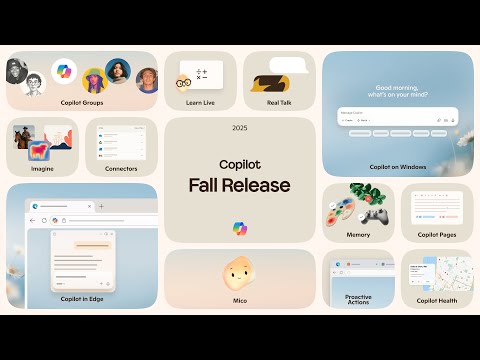
The release includes 12 new features, marking a deliberate departure from what Mustafa characterises as extractive technology design: “We’re betting on optimism in a time of cynicism,” he says.
“Technology should work in the service of people. Not the other way around. Ever.”
“Instead of tech that demands more attention, we’re making tech that gives you back time for the things that matter. Instead of AI that replaces human judgment, we’re building AI that empowers your own.”
Central to the release is Groups, which allows up to 32 people to interact with Copilot simultaneously in a shared session.
Users invite participants through a link, with the system summarising conversation threads, proposing options and distributing tasks among group members.
This means that the feature is Microsoft’s attempt to position AI as a tool for connection rather than individual consumption.
“Some companies will optimise fully for 1:1 engagement – but with Copilot we’re focusing on an AI that understands the importance of keeping us connected to real people,” Mustafa says.
Microsoft states it is developing metrics to measure what it calls social intelligence, tracking how the system elevates group conversations rather than simply engagement time.
The company has also introduced memory capabilities that retain user information across sessions.
- Groups
- Imagine
- Mico
- Real Talk conversation style
- Memory & Personalization
- Past conversation referencing
- Connectors
- Proactive Actions
- Copilot for health
- Learn Live
- Copilot Mode in Edge
- Copilot on Windows with “Hey Copilot”
The Memory & Personalization feature allows users to instruct Copilot to remember specific details, from training schedules to personal milestones, which the assistant recalls in future interactions.
Microsoft emphasises user control, with the ability to edit or delete stored information at any point.
“Technology should work in the service of people. Not the other way around. Ever,” Mustafa says. “That’s the principle behind Copilot. In this, it’s not just a product – it’s a promise.”
The system now includes connectors linking to services including OneDrive, Outlook, Gmail, Google Drive and Google Calendar, products from Microsoft and Alphabet Incorporated respectively.
These allow users to search across accounts through natural language queries, with Microsoft requiring explicit consent before accessing data.
How Copilot targets health and education applications
Microsoft has also developed Copilot for health, grounding responses to health queries in sources including Harvard Health, a publication from Harvard Medical School.
Copilot for health
The tool matches users with doctors based on specialty, location and language preferences, addressing what the company identifies as one of the most common uses for AI chatbots.
Learn Live
Furthermore, Learn Live introduces voice-enabled tutoring that guides users through concepts using questions rather than direct answers, a method Microsoft describes as Socratic.
The feature includes interactive whiteboards and visual cues, positioning education as an area where AI can support rather than replace human learning.
Mico
The company has additionally introduced Mico, a visual character that appears during voice interactions with Copilot.
Named after Microsoft Copilot, the character changes colours and displays expressions in response to user interactions, creating what Microsoft describes as a warmer experience. The feature is optional.
Copilot Mode in Edge
Meanwhile, Copilot Mode in Edge, Microsoft’s web browser, allows the assistant to analyse open tabs, summarise information and perform actions including form completion.
On Windows 11, Microsoft’s operating system, Copilot responds to the wake word “Hey Copilot” when enabled, with access to recent files and conversations.
Microsoft states it is deploying proprietary models including MAI-Voice-1, MAI-1-Preview and MAI-Vision-1 alongside third-party models, describing this as part of its strategy to deliver what it considers the best capabilities for users.
The features are rolling out in the US, United Kingdom, Canada and other markets.
Users can access Copilot through applications for iOS and Android, operating systems from Apple Incorporated and Alphabet respectively, or through web browsers at copilot.microsoft.com.
“It’s in this context that we talk about an AI companion,” Mustafa says.
“It helps you think, plan and dream, but always on your terms. It adapts to your needs and context, remembers what matters to you and learns from your feedback.
“As we build this, we’re not chasing engagement or optimizing for screen time. We’re building AI that gets you back to your life.”
Company portals

Executives

Mustafa Suleyman
CEO of Microsoft AI